Wednesday, May 6, 2015

Multitasking and the Effect on Learning / Infographic and Reflection


Multitasking and the Effect on Learning

Analysis and Reflection of Infographic

The Information:

Multitasking is a pertinent topic for me as a high school teacher. Almost every student has a cell phone, and multitasking with technology is pervasive. I wanted to see if student learning was affected by multitasking.
I found numerous articles on multitasking, and as I started reading them, I became curious to see what my own students would say about their multitasking behaviors. I decided to create a survey to find out. Even though I only surveyed one class, my seniors, I included the results in my infographic. (Due to SBA testing, computer labs and laptop carts were unavailable for other classes.) I asked several other classes the questions, and by a show of hands, the results were similar. Although the sample size may be too small to be scientifically valid, I believe the results are indicative of the behaviors of many high school students. The bottom line is that almost all students multitask while doing schoolwork. Many think that their understanding and task efficiency are unaffected by their multitasking. However, the question remained, is their learning affected.
The majority of research suggests that learning is affected by multitasking, mostly negatively. The article,"You'll Never Learn" by Annie Paul was especially helpful. She included the results of a study by Larry Rosen of the University of California. Rosen studied the behavior of 263 middle, high school, and university students. Rosen found that the average time on the primary task before switching was less than 6 minutes. He did find, however,  that students who were accustomed to high media use were more likely to stay on task. This finding coincides with a study described in The Wall Street Journal. Two high school students from Oregon studied the multitasking behaviors of 400 high school students. The study took two years to complete and won second place at the Intel International Science and Engineering Fair in May 2014. The young women found that while 85% of students did not perform as well when multitasking, 15% actually performed better. The individuals who performed better were considered “high media multitaskers.” The authors of the study hypothesize, “What our research is suggesting is that maybe our brains as adolescents and digital natives have adapted to this media influence” (Reddy).
While it is unclear if the ability to multitask will prove beneficial in the future, the research shows that for the most people it is is detrimental to learning. David Meyer, a psychology professor at the University of Michigan notes, “Under most conditions, the brain simply cannot do two complex tasks at the same time. It can happen only when the two tasks are both very simple and when they don’t compete with each other for the same mental resources” (Paul). He goes on to say, “Young people think they can perform two challenging tasks at once, but they are deluded” (Paul). Many students believe they are working efficiently when they are multitasking, but for most of them that is simply not true. Meyers also found that the brain stores information differently when distracted. Brain scans show different memory patterns which may make it harder to apply new knowledge (Paul).
A study by Song et al, "Analysis of Youngsters Media Multitasking Behaviors and Effect on Learning", supports the findings of Rosen and Meyer. In a 2011 study of 866 university students, the authors found that multitasking had harmful effects on learning. Frequent task switching led to fewer correct answers. The negative effects of multitasking were somewhat mitigated when task motivation was high, but mostly they found that learning suffered (Song).
Since multitasking is so prevalent and since effects for most students are negative, it is important to offer students strategies to become more efficient learners. Rosen proposed the idea of encouraging to take “tech breaks.” Based on the principle of delayed gratification, students can treat themselves to a “tech break” only after working for a fixed amount of time (Paul). When I explained this strategy to my students, several of them said that they do that. It’s also important to make students aware of the negative effects of multitasking so that they can become more productive. Finally, mindfulness is gaining popularity as a means to increase focus on learning. In the article, "How Meditating Helps With Multitasking", Tina Barseghian describes David Levy’s work. Levy, a professor at the University of Washington,  proposed that schools need to “teach the tools that will teach kids to focus, avoid distraction, and judge what to pay attention to as they’re exposed to a slew of diversions. It’s a matter of training the brain” (Barseghian).
What we do know is that people multitask all the time. We know that for the majority of people, it compromises learning. Whether the brain will actually “rewire” itself over time remains to be seen. The Pew Research Center conducted a survey of technology experts asking them whether “the younger generation’s always-on connection to people and information will turn out to be a net positive or a net negative by 2020”(Pew). 42% believe that future looks “baleful.” They worry that deep thinking capabilities and face-to-face social skills will suffer. Overall, they believe the changes in behavior and cognition will lead to negative outcomes (Pew). On the other hand, 53% believe that the younger generation will benefit from the amount of information available to them. They will learn more, rather than less. They will be able to use multitasking to their benefit as they learn to search more efficiently and access collective intelligence via the internet. They see positive a positive outcome (Pew).
One thing that is clear to me after doing the research is that we really don’t know the long term effects of our technological age on the brain and learning. It seems important, however, to make students aware of the need to focus. While multitasking is likely here to stay, students need to learn how to use the information available to them to their advantage so that they can work efficiently and productively to maximize learning.

The Process:

Before starting my infographic I researched articles about multitasking. I wasn’t surprised to learn that its effects on learning are more negative than positive. I also wasn’t surprised that my own students all multitask. I was a little surprised at how quickly they are distracted.
The creation of the infographic was challenging at first. I used Piktochart, and although it wasn’t difficult, it took me a while to get the hang of it. The suggestions of my colleagues helped me to organize my information. They also gave me ideas about  information to include in the survey I gave to my students. I thought it was important to give some statistics about the prevalence of multitasking. I also wanted to show what kids thought the effect of multitasking had on their learning. That’s where my survey came in. So the first part of the infographic was a student self-analysis.
I included information from the research I did in the second part. I didn’t have as many statistics here, but I was able to include the effects of multitasking based on several studies.
Finally, I wanted to end with suggestions on how to deal with multitasking. Hence, I included some ideas for strategies that students could use to become more efficient learners.
Creating an infographic would be an excellent learning activity in my classroom. It forces students to identify the critical information on a topic and organize it in a logical way. The nature of the medium encourages creativity and allows students to showcase what they have discovered on a given topic.
Citations:

Anderson, J., & Rainie, L. (2012, February 28). Millennials will benefit and suffer due to their hyperconnected lives. Retrieved May 5, 2015, from http://www.pewinternet.org/2012/02/29/millennials-will-benefit-and-suffer-due-to-their-hyperconnected-lives/

Barseghian, T. (2011, October 26). How Meditating Helps with Multitasking. Retrieved May 4, 2015, from http://ww2.kqed.org/mindshift/2011/10/26/how-meditating-helps-with-multitasking/
Paul, A. (2013, May 3). You'll Never Learn: Students Can't Resist Multitasking and It's Impairing Their Memory. Retrieved May 5, 2015, from http://www.slate.com/articles/health_and_science/science/2013/05/multitasking_while_studying_divided_attention_and_technological_gadgets.html
Reddi, S. (2014, October 13). Teen Researchers Defend Media Multitasking. Retrieved May 4, 2015, from http://www.wsj.com/articles/teen-researchers-defend-media-multitasking-1413220118
Song, K., Nam, S., Lim, H., & Kim, J. (2013). Analysis of Youngsters' Media Multitasking Behaviors and Effect on Learning. International Journal of Multimedia and Ubiquitous Engineering, 8(4), 191-198.Retrieved May 4, 2015 from http://www.sersc.org/journals/IJMUE/vol8_no4_2013/19.pdf


Friday, April 17, 2015


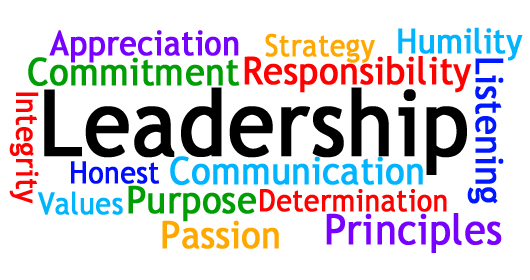
leadership.jpg

In order to revise a lesson to incorporate more technology, I decided to upgrade a lesson that I have previously taught. I am getting ready to teach the novel, Lord of the Flies to my sophomores. As we read, we discuss various themes and one of the most prominent is leadership. Previously, I had the students conduct an activity called “Build-a-Boss.” They had to identify leadership traits in various categories and provide a rationale for their choices. They also had to provide a real world example of a person who embodied each trait. I never wrote the activity up in a formal lesson plan, but I have included the graphic organizer which the students completed in the Initial Lesson.
When we were challenged with the task of infusing more technology into a lesson, I thought the Build-A-Boss activity offered multiple opportunities for expansion. Even better, I will be able to use the new and improved lesson in the next few weeks.


Here is my revised lesson plan, retitled "Build-A-Leader."

I added technology in several areas. First, I decided to have the students do a bit of research on leadership qualities, so I incorporated a small research component into the lesson. In the past, I read an article or two with them, but having them do the research makes them more active learners and allows me to move into the role of facilitator. Students will work collaboratively in groups of 2-3 to complete a note taking graphic organizer as they conduct their research.
I wanted to add some creativity to the lesson, and I came up with the idea of having the students create an avatar of the ideal leader utilizing the traits which they have identified. We created our own avatars in a previous IT&DML class and I thought it was a lot of fun. I really looking forward to this part of the activity. I think the kids will be really engaged and more importantly, it will really make them think about the leadership traits they believe an effective leader should possess. Each group will collaborate to write a rationale explaining their avatar and they will share their creations with the class. Finally, we will discuss and write about leadership qualities as they relate to the characters in Lord of the Flies.
My support team of Monica Hayes and Christel Russman had some suggestions which really helped me develop my lesson. Monica suggested that in order to differentiate for accelerated students, I could have them make more in depth comparisons to real world examples. As I was reading Monica’s comment, I noticed that April 16, 2015 issue of  Time was about the 100 most influential people in 2015. I included a link to the site in my lesson plan and thought that would be a great way for kids to identify current leaders in various categories. Christel also had a great idea for a lesson extension which I included. She thought that it would be interesting to have kids look at the qualities of people and characters who are not leaders. We could look at followers and outcasts and analyze their traits and how they relate to others. My support team was also very encouraging of the lesson development as a whole, which makes me excited to give it a try.


My revised lesson reflects the categories of the SAMR model.


Substituting, as the image above indicates, involves adding technology without any functional change. By having students write their rationale on Google Docs instead of with pen and paper, I am in effect, substituting technology.  However, when students collaborate on the piece of writing, they are moving into the augmentation category when they use Google instead of traditional pen and paper. Google allows them to work simultaneously and to edit, revise and share each other’s work. The research component falls under the category of modification. Instead of having me provide the students with articles to read about leadership, they can search and find their own, giving them far greater ownership in the project. Finally, the use of various sites to create an avatar falls under redefinition. Students are synthesizing the information they found in their research and creating a unique symbol using multiple images provided on the avatar creation website.  Additionally, using a presentation site to share their avatars with the class allows students to be more engaged and to have a much better understanding of each others’ work.
Technology plays a key role in education today. I think that as teachers we need to look critically at where we can incorporate it to enrich the learning experience. We don’t need to “reinvent the wheel,” but by using some imagination we can make simple adaptations to lessons that we have already created to provide an additional dimension to student learning.


Citations


"Physical Appearance Key to Management Success: Study."Www.canada.com. Postmedia Network, Inc., n.d. Web. 16 Apr. 2015.


"Political Performance Indicator." Political Performance Indicator. Humanetrics.com, n.d. Web. 16 Apr. 2015.


"The 100 Most Influential People." Time 16 Apr. 2016: n. pag. Time, 16 Apr. 2015. Web. 16 Apr. 2015.


"Top 10 Qualities That Make A Great Leader." Forbes. Forbes Magazine, 19 Dec. 2012. Web. 16 Apr. 2015.


Wednesday, April 15, 2015


The definition and purpose of Assistive Technology has certainly changed over the years. As we reflect on this evolution, how has the change in definition impacted how Assistive Technologies are perceived and used in the classroom? To what might we 'truly' attribute this evolution?

The use of technology in general has skyrocketed over the last few decades and along with it the use of assistive technology has grown. After reading Beard (chapter 1) and Bryant (chapter 1), it is clear that the evolution of assistive technology (AT) has been spurred on by the passing of legislation mandating the incorporation of AT into education. As the Bryant article notes, “The most profound changes in AT have occurred as a result of The Individuals with Disabilities Education Act and its subsequent reauthorizations” (Bryant p. 4). The initial law in 1975 mandated access to schools for individuals with disabilities. In 1990, the law broadened to require access to classrooms. In 1997, the law became access to the general education curriculum, and in 2004 access to instructional materials was mandated (Bryant p. 4).

Both Beard and Bryant define AT similarly as “an item or piece of equipment or product system acquired commercially, off the shelf, modified, customized, and used to increase, maintain, or improve functional capability for an individual with disabilities” (Beard p. 4). Beard also points out that AT can also be beneficial for ELL students, at risk students, and gifted students. However, in a training package prepared by IBM in 1991, the importance of AT for individuals with disabilities is stressed. IBM stated, “For people without disabilities, technology makes things easier. For people with disabilities, technology makes things possible” (Bryant p. 1).

Beard identifies levels of AT and states, “Technology does not have to be sophisticated and expensive to be effective” (p. 11). He identifies levels of AT on a continuum from no tech, where the student does not need or is not ready for a device, to light tech, which can be as simple as pencil grips, enlarged print or special paper (p.10). At the far end of the spectrum are high tech devices such as computer or voice activated devices. Bryant also distinguishes between assistive technology devices and services. Services are equally as important as devices. Students need to be evaluated; AT devices need to be carefully selected and purchased. Additionally, training of students, families and professionals must be conducted (p. 8-9). Finally, both authors agree that securing funding for AT should be a joint proposition between school districts, families, government agencies and other organizations. While school districts are required to fund AT that is listed in a student’s IEP, often other sources of funding may be available.

When I was reading about the various levels of AT, I was reminded of one of my students who graduated last year. I had Lily as a student in my sixth grade language arts class and again in a senior English class. (I had switched from middle school to high school.) Lily was blind and also had mobility issues. Her access to and use of technology changed over time. In sixth grade she was struggling to learn to read and write Braille. Her Braille typewriter fell on the higher tech end of the AT continuum but caused her a great deal of frustration. One of the best “no tech” adaptations we made was part of a group project. The kids were recreating scenes from the book, Where the Red Fern Grows. The kids in Lily’s group decided that their scene re-creation would be textured and 3-D. They brought in sticks, moss, grass and assorted other materials. Lily was totally involved and the project was a successful learning experience for everyone.  

In preparation for Lily’s senior year, I submitted a list of the books we would be reading to Lily’s case manager. She ordered all the books from a library for the blind. (They were all free - which is a good example of collaborative funding.) However, as the year progressed, Lily found it far more efficient to listen to audio versions of the books which were widely available. She still wrote in Braille and a paraprofessional transcribed her work. (I’m surprised she didn’t have a voice activated computer device, which if I had taken this class then I would have investigated!) By senior year, the focus was on what worked for Lily. Lily became an advocate for her own learning. After graduation, she continued to work on life skills through the school system and The Bureau of Education and Services for the Blind. At her final PPT there was a long list of attendees representing the various therapists and organizations who had been instrumental in coordinating her education. The assistive technology and services Lily received made her education possible. However, it is Lily who deserves the most credit. She never complains and never gives up. Lily is a true success story, and as a result, she is an inspiration to everyone who knows her.

While I don’t have a lot of experience with assistive technology, I see the possibilities. There are a lot of Lily’s out there who can accomplish great things. I am eager to learn more because the benefits are enormous.

Citations

Beard, L. A., Carpenter, L. B., & Johnston, L. B. (2011). Assistive technology: Access for all students (2nd/3rd ed.). Toronto: Pearson Education.

Bryant, D. P., & Bryant, B. R. (2012)/ Assistive technology for people with disabilities (2nd ed.). Upper Saddle River. Pearson Education.


Thursday, April 9, 2015

Effective Teaching Strategies / ED 7726 / Week 1


Summarize your learning, recommend a strategy to your readers, make suggestions to educators on aligning technology with standards, explain the importance of this alignment, describe how Marzano/Hattie fit with CCSS, etc. In other words, your blog should be informative, not simply reflective.


    The instructional strategies described by Marzano and Hattie align well with the Common Core State Standards (CCSS). As an English teacher, I am responsible for the Literacy Standards which include reading (literature and informational text), writing, speaking and listening, and language. Without getting into the specifics of each standard, the standards focus on depth of knowledge rather than breadth. Learning should be challenging and meaningful. Students need to focus on developing the creative thinking and problem solving skills necessary to be productive in our rapidly changing 21st century.


The high school English curriculum at my school includes all the literacy standards, but this year we are focusing on close reading. Most of the Marzano’s strategies can be used to improve close reading skills. I highly recommend the use of nonlinguistic representations.


     As I described in the Group Grid, I have had students use geometric shapes to represent characters in a novel. Students have to choose a shape for each character. We discuss whether the shape should be rounded or have lots of angles, depending on the personality traits of the characters. They have to choose a color for each shape which leads to a discussion of the symbolism inherent in various colors. Students also have to decide on the size of the shape and the placement on the page. This leads to discussions of the interrelationships between characters. Questions arise such as “Who has power?” and  “How do characters feel about each other?” Finally, students can connect (or disconnect) the characters in some way. The activity may be done with or without technology. If the technology is available, Google Drawing would work very well. In addition to having students think deeply about the characters, they would have to figure out how to use the features on Google Draw to create the representation. The same activity may also be done with paper and colored pencils. The thinking processes would be the same as students decide how to represent the characters. Technology may enhance the activity and provide an additional dimension of learning, but is not essential to the main objective.


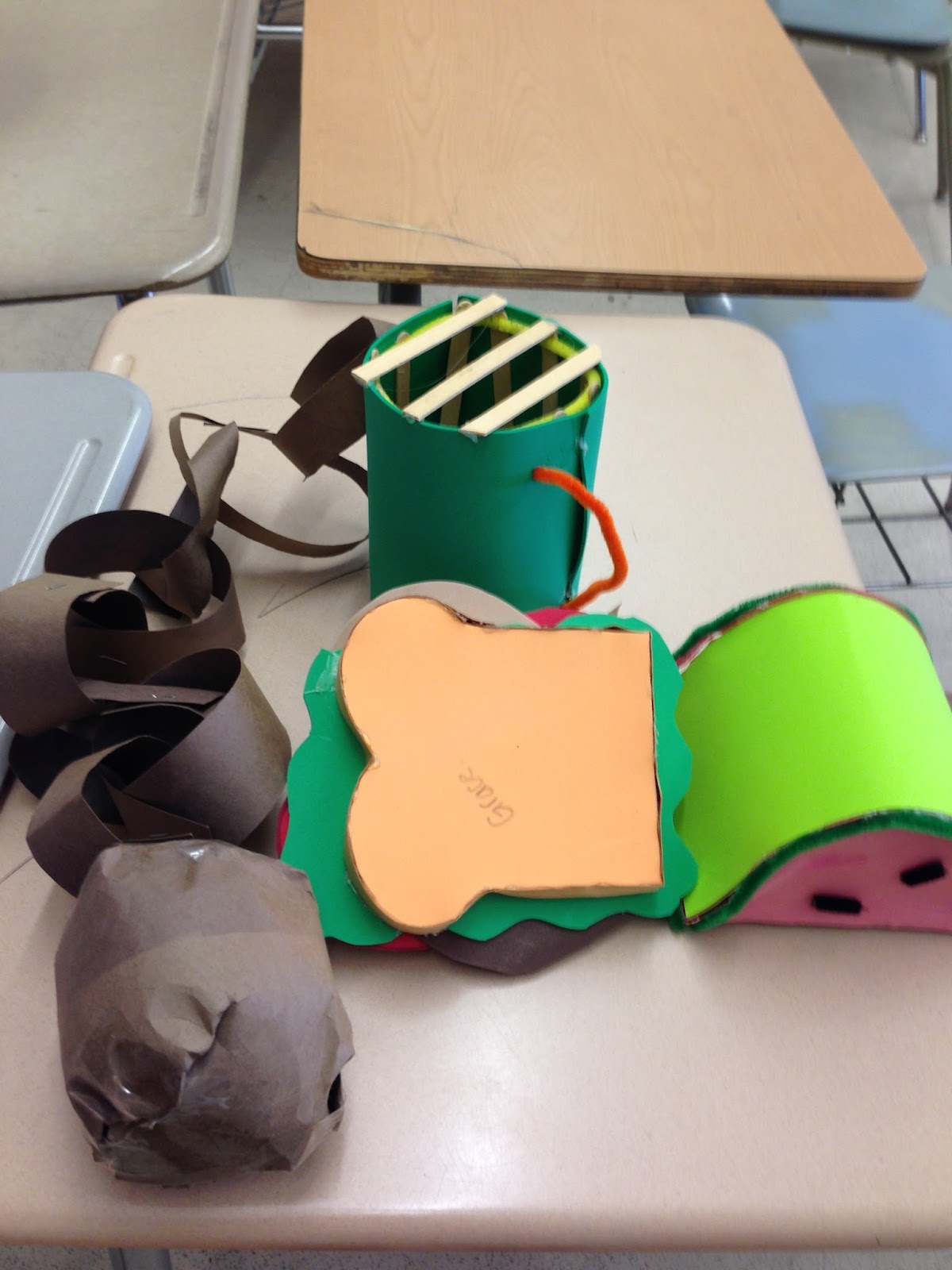
Nonlinguistic representations can be used in other ways. Creating representations does not need to be limited to shapes. Characterization is a big part of our English curriculum, and I have had students create nonlinguistic representations of characters using random arts and crafts supplies. The creativity can be astounding. For example, students have created sandwiches with multiple layers, balls and chains, and watermelon to symbolize various characters. The explanations are very creative!


What could a sandwich, a ball and chain, and slice of watermelon possibly have to do with Catcher in the Rye or Looking for Alaska?
photo.JPG


Again, character symbols could also be created using technology. Padlet  and Thinklink are great collaboration tools. Kids could upload a picture onto a group document which could then be shared with the class. The benefit would be that everyone in the class could contribute to one document which could facilitate a lively discussion.


Vocabulary instruction is another area which lends itself to the use of nonlinguistic representations. Kids can create symbols to demonstrate the definition of vocabulary words. Displaying the words and pictures on a word wall serves to reinforce vocabulary instruction. Again, technology is not essential to conduct the activity, but can be helpful. Collaboration tools would make this an excellent class activity. In addition, the website Kahoot, is an excellent way to reinforce the definitions with kids. It’s a quiz website. Teachers can create a quiz, display it on the SmartBoard, and students press answers on their cellphones or laptops. Scores are based on accuracy and speed. Kids love it.


John Hattie stresses several points which I consider important for effective instruction. One is the need for feedback. Students need constructive feedback in order to improve. Technology provides an excellent way to give students the feedback they need. On the group grid, Monica Hayes discusses the use of Google Docs as a way to provide “live” commentary to kids as they are working on a project. Using technology to provide feedback during the writing process is a very efficient way to improve kids’ writing.


Another point which Hattie discusses is the importance of the mindset of the teacher. Not only do teachers need to evaluate their students, but they need to evaluate their own teaching. When students aren’t understanding something, teachers need to figure out a different way to present it. Teachers need a “toolbox” of strategies and they need to be prepared to switch gears when things aren’t clicking.


Technology plays a big role in a teacher’s toolbox, but it’s not the only tool in there. As Marzano says, “Technology tools must be chosen strategically when they add value to learning.” Technology aligns well with all of the Common Core Standards. However, it’s up to the teacher to decide when and how to use it. Many of the objectives described in the standards can be achieved without technology as I indicated above. However, technology adds another dimension. Students are going to be expected to be more than proficient in technology in college and in many careers. It’s important that they become comfortable navigating different platforms and mediums. Technology also has the advantage of increasing student engagement in many cases. It fosters collaboration and frequently requires problem solving skills. (Technology doesn’t always work the way it’s supposed to!) A teacher’s mindset needs to be open and flexible. Just as Marzano reminds us that we don’t need to use every strategy for effective instruction every day, we don’t need to use technology for every lesson. However, it’s definitely an extremely important “tool in the toolbox.”


References from the week’s readings:


Technology in Schools: Future Changes in Classrooms

Thursday, March 26, 2015

Google Classroom Review / Distance Learning / ED 722

Distance Learning Medium Review of Google Classroom / ED 722

Personal Online Case Study / Final Reflection on Distance Learning / ED 722

Jody Ceglarski
Distance Learning / ED 722
March 26, 2015
Personal Online Case Study


Three words come to mind to describe the qualities necessary to be a successful online learner and educator: ingenuity, patience, and persistence. I’m not there yet, but I’m working on developing all three. When I run into a technological snafu (which happens frequently), I find myself thinking of Albert Einstein’s quote after I have repeatedly failed to rectify an issue by doing the same thing “over and over again.” Too often I demonstrated a lack of ingenuity, impatience and little persistence. Now, whether something won’t upload onto YouTube, or I can’t figure out the timing on a Powtoon, I am learning to take a deep breath and try something different - ingenuity. I am also learning to be patient - some things take time. Finally, I am learning persistence - I rarely give up.
As a high school English teacher, I am not currently in a position to be an online educator. High school students need face to face interaction and a personal connection with the teacher. However, I have markedly increased my use of technology in the classroom, largely thanks to the IT&DML program at University of New Haven. I believe that this semester I have become much more comfortable with the new platforms and applications that I am now sharing with my students. The combination of classes in the IT&DML program this semester, Distance Learning and Global Literacy, proved to be perfect partners. I not only gained a lot of technological skill, I was exposed to many global resources that I was previously unaware of. In addition, the Distance Education class and readings helped me to see how to use Internet resources effectively with my students. I also began to see my role much more as a facilitator as I attempt to move my students from passive learners to active ones.
My shift towards blended learning has been fostered by my implementation of Google Classroom this year. I wasn’t sure how it would work, but I am very pleased with it so far. My school also has more Chromebooks available this year, which has enabled me to give my students much more time to research, read, and create online. As part of the Common Core, one of our goals in the English Department has been to increase the quantity of nonfiction that our students read. I have used Google Classroom to provide links to multiple articles on whatever topic is at hand. Students have been able to log on and choose the article they want to read and share with the class. By providing students with choices of multiple resources, not only has engagement grown, but class knowledge has expanded as students share their articles with one another.
I have also implemented a great deal of choice in assessments. The five paragraph essay is falling by the wayside (finally!) Kids still write essays, but frequently they choose to present their learning in a variety of mediums. A few of the platforms I have introduced my students to are Prezi, eMaze, Thinglink, Powtoon, Animoto, Piktochart, Pixton, and Storify (one of my favorites). Of course the old standbys on Google Docs are available, but students are becoming more adventurous. Students get excited about projects and I think it’s largely because they have a choice in topics and in format. With the experience that I am gaining in my classes at UNH, I am more comfortable helping kids when they have a technological problem. We try a different approach to fix the glitch instead of doing the same thing “over and over again!” I’m also not afraid to admit when I’m not sure how a site works; we look at it together and figure it out.
In addition to getting new ideas from the readings and classes, my colleagues have provided inspiration to me to explore new topics. I learn a lot by reading everyone’s responses to the prompts each week. It’s comforting to know that others struggle with the same issues (such as lack of homework completion or introduction of multiple initiatives at once), yet they find ways to work around it as I try to do. I enjoy seeing the technological tools that my colleagues choose to use. I’m not afraid to try new things on my own or with my students. Getting rid of that “fear of failure” is liberating.
The Distance Learning class has also exposed me to the value of social media in education. In particular, I see that there is a lot I can learn on Twitter. Completing the Storify each week gave me an opportunity to find additional resources and Twitter was a productive source. I still want to learn more about maximizing the use of social media and other open learning opportunities. There’s so much to learn and so little time.
At the end of this semester, I will be more than halfway through the Sixth Year Program. When I started the program I thought that I would learn what I had to and be finished. Now I see that I am just scratching the surface. As far as the program goes, my blog continues to grow, but I know I have a lot of work to do on my learning hub. My website definitely needs to be developed further. I also look forward to the remaining classes. I want to continue to expand the role of technology in my high school classes. Again, I stress my belief that creating a personal connection with my students is invaluable. However, I am excited by the prospects that the Internet has to offer. The resources that I can pass along to my students are endless. Twenty-first century skills are a requirement for students today. Kids need to be able to navigate the Web and synthesize a plethora of resources. They need to be creative problem-solvers and clear communicators. My classroom is definitely moving towards a blended learning environment as I hope to help my students achieve the skills they need to be productive members of society.
I’m so much more comfortable now with online and blended learning than I was at the start of the program. I feel that I now have the confidence to learn on my own. After all, there’s a YouTube tutorial on just about everything! My learning won’t be finished at the end of the summer. It’s really just the beginning. And when I get frustrated or discouraged, I just need to remember, “ingenuity, patience and persistence.”

Image credit (tumblr.com)


Thursday, March 12, 2015

Teach Like A Pirate / Distance Learning / Week 7

Please discuss the most potent points in the discussion this week. What instructional and pedagogical opportunities are out there to build student voice, choice, and agency? How will you create learning experiences for your unique learners?

Dave Burgess wrote the book, Teach Like A Pirate to share his philosophy of teaching. After listening to the video chats, his outlook on education is simple: “Don’t just teach a lesson, create an experience.”  The participants in the first discussion talk about the “secrets of engagement.” Again, it’s simple - tie whatever you’re doing into something kids are already interested in.

Burgess divides teaching into three parts.

One of Burgess’ main points is that teachers learn about content, techniques and methods in school, but they rarely learn about presentation which is the key to delivering successful lessons.

I agree with a lot of what Burgess says. While I’m not really one to dress up as literary characters to get my students’ attention, I do try to engage them in other ways. I try to make my lessons as participatory as possible. I strongly believe that learning should be active not passive. The increased use of technology has helped a lot to get kids engaged.

Choice is another important factor in creating engagement and I try to incorporate choice into activities as much as possible. For the semester 1 writing unit, students had to write an argument essay. Thanks to the availability of Chromebooks for my classroom, I was able to provide links to the NY Times Room for Debate section where students could choose from a multitude of topics to research. Students were much more engaged and I benefitted by not having to read 85 essays on the same topic. For other projects, students have had choice in the way that they present information. We’ve also conducted research projects on various topics and students have “jigsawed” to share their newfound knowledge with the rest of the class. We’ve used various platforms to present information (mostly thanks to what I’ve learned in the IT&DML program) including Storify, Prezi, Powtoon, Animoto, Haiku Deck and Google Docs. I have also spoken with our Literacy Consultant about creating a literature circle unit this spring. We are going to work together to give kids several choices in what they read in the hopes of increasing engagement in reading.

When I started listening to the Google Hangout about gaming, I will admit that I was skeptical. My initial reaction was that everything can’t be made into a game - learning is just plain old hard work sometimes. However, when Burgess explained that it’s not necessary to turn everything into a game it began to make sense. Basically, teachers need be prepared to have a multitude of strategies at their disposal because you never know what will work. Figuring out ways to incorporate popular ideas into content is one way to make learning fun and relevant for kids. The bottom line though is that you need to do anything that works.

I try to mix up the type of activities in my class as much as possible. I want to share my passion for what I’m teaching with the kids. I want to continue learning and I’m constantly looking for new ideas. I’m not ready to dress up as Louis XIV and gorge on food as an intro to the French Revolution as one of the teachers participating in the hangout did, but I try my best to make learning interesting so that my students will be actively engaged in their work.


And here is my Week 7 Storify: Voice and Choice